
Rules versus Hooks
Why This Matters
A rule in CLAUDE.md is a request. Usually the agent follows it; sometimes, deep into a long session, it does not. A hook is a command that runs automatically at a fixed moment in the agent’s lifecycle. It does not depend on the model remembering anything. Anything that must always happen belongs in a hook or in CI.
Pre-commit checks first
Before agent-specific hooks, make sure the classic gates exist, because they protect against everyone, human or agent:
# package.json scripts
"lint": "eslint .",
"typecheck": "tsc --noEmit",
"check": "npm run lint && npm run typecheck && npm test"
Run npm run check in a git pre-commit hook (for example with husky or lefthook) and again in CI.
Agent hooks
Claude Code can run your commands at lifecycle events, configured in .claude/settings.json. The most useful events:
| Event | Runs | Typical use |
|---|---|---|
PreToolUse | Before a tool call | Block dangerous commands or edits to protected paths |
PostToolUse | After a tool call | Format or lint the file that was just edited |
Stop | When the agent wants to finish | Run the check; send it back to work if red |
SessionStart | When a session starts | Load extra context, check the environment |
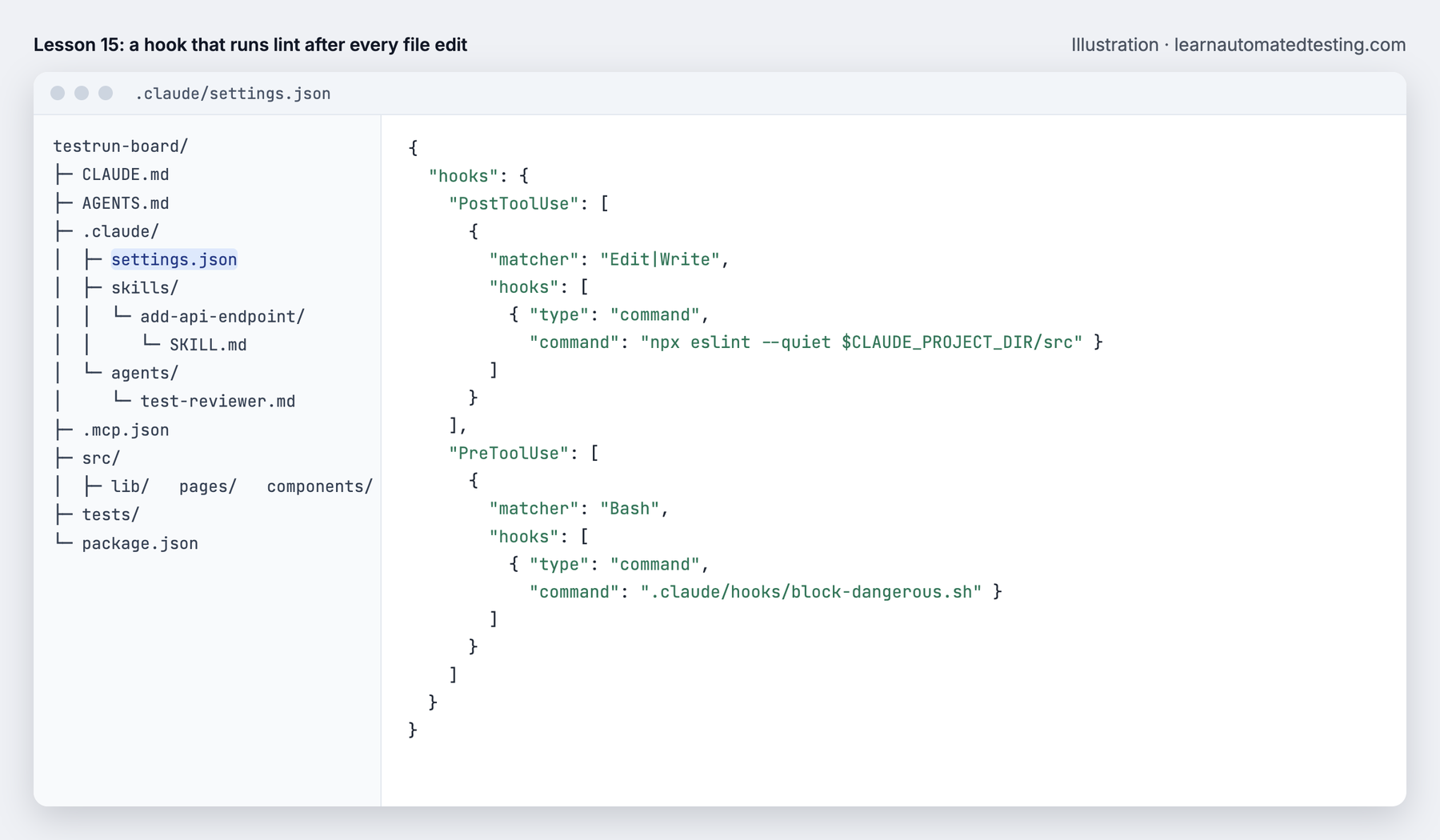
A hook that blocks dangerous commands
A PreToolUse hook receives the planned tool call as JSON on stdin. Exiting with code 2 blocks the call and sends your message on stderr back to the agent:
#!/usr/bin/env bash
# .claude/hooks/block-dangerous.sh
cmd=$(jq -r '.tool_input.command // ""')
if echo "$cmd" | grep -Eq 'git push|rm -rf|--no-verify'; then
  echo "Blocked by project policy: $cmd. Ask the user instead." >&2
  exit 2
fi
exit 0
The example repository implements its hooks in Node instead of bash and jq, so they run the same on macOS, Linux and Windows: see .claude/hooks/block-dangerous.mjs, protect-paths.mjs and lint-changed-file.mjs. It also blocks npm install <package>, because adding dependencies needs approval.
This is what the agent actually receives when the TestRun Board hooks block it (real output):
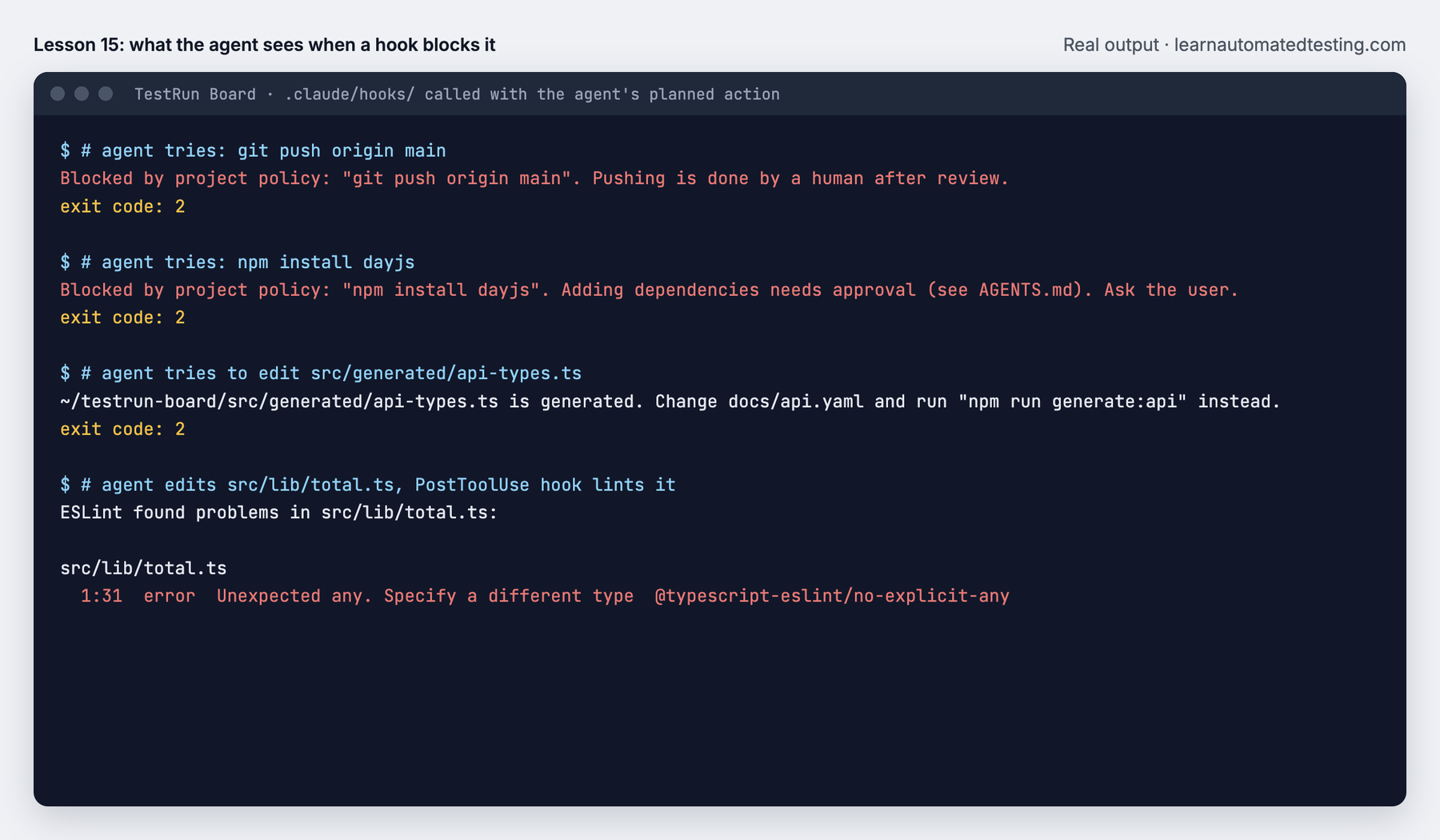
Every message says what was blocked, why, and what to do instead. That last part matters: the agent reads it and usually adapts on the first try.
The same pattern protects test files during a fix task, blocks edits to src/generated/, or prevents reading .env files. Make the script executable and commit it with the settings.
Rules versus hooks: what goes where
| Put it in a rule when… | Put it in a hook (or CI) when… |
|---|---|
| It is guidance or style | Breaking it causes damage |
| Judgement is needed | A script can decide it |
| An occasional miss is acceptable | It must hold every single time |
| Example: “prefer small functions” | Example: “never push”, “lint must pass” |
Keep hooks fast (a few seconds), deterministic and with clear error messages: the agent reads them and acts on them.
Hands-on
- Add a
PostToolUsehook that runs your linter afterEdit|Write. - Add the
block-dangerous.shhook and test it by asking the agent to push. - Pick one rule from your CLAUDE.md that was broken in the last week and turn it into a hook.
Walkthrough in TestRun Board
- Read
.claude/settings.json:PreToolUserunsblock-dangerous.mjsfor Bash andprotect-paths.mjsfor edits;PostToolUserunslint-changed-file.mjsafter every edit. - In a session, try each one:
- “Push this branch.” → blocked: pushing is done by a human after review.
- “Add dayjs to format the dates.” →
npm install dayjsis blocked: dependencies need approval. - “Fix the type in src/generated/api-types.ts.” → blocked, with the instruction to change
docs/api.yamland runnpm run generate:api. - “Add a helper that sums durations, typed as any[].” → the edit happens, then ESLint reports
no-explicit-anyand the agent fixes it.
- Test a hook without the agent, the way the course screenshots were made:
echo '{"tool_input":{"command":"git push"}}' | node .claude/hooks/block-dangerous.mjs; echo "exit $?" - Also look at
.githooks/pre-commit: it runsnpm run checkon every commit (installed bynpm installthrough thepreparescript), for humans and agents alike.
Key Takeaways
- Rules ask; hooks and CI enforce.
- Start with classic pre-commit and CI gates; they cover humans and agents.
PreToolUsewith exit code 2 blocks an action and tells the agent why.- Keep hooks fast, deterministic and clear in their messages.