
Grow the Feature: Planning Larger Changes
Why This Matters
Small features can go straight from prompt to code. Larger ones should not. When an agent starts editing before the approach is agreed, you review a big diff built on assumptions you never saw. Planning first moves the disagreement to the cheapest moment: before any file changes.
Plan mode
In Claude Code you switch modes with Shift+Tab: normal, auto-accept edits and plan mode. In plan mode the agent can read and investigate but does not edit files. It returns a plan you can approve, change or reject.
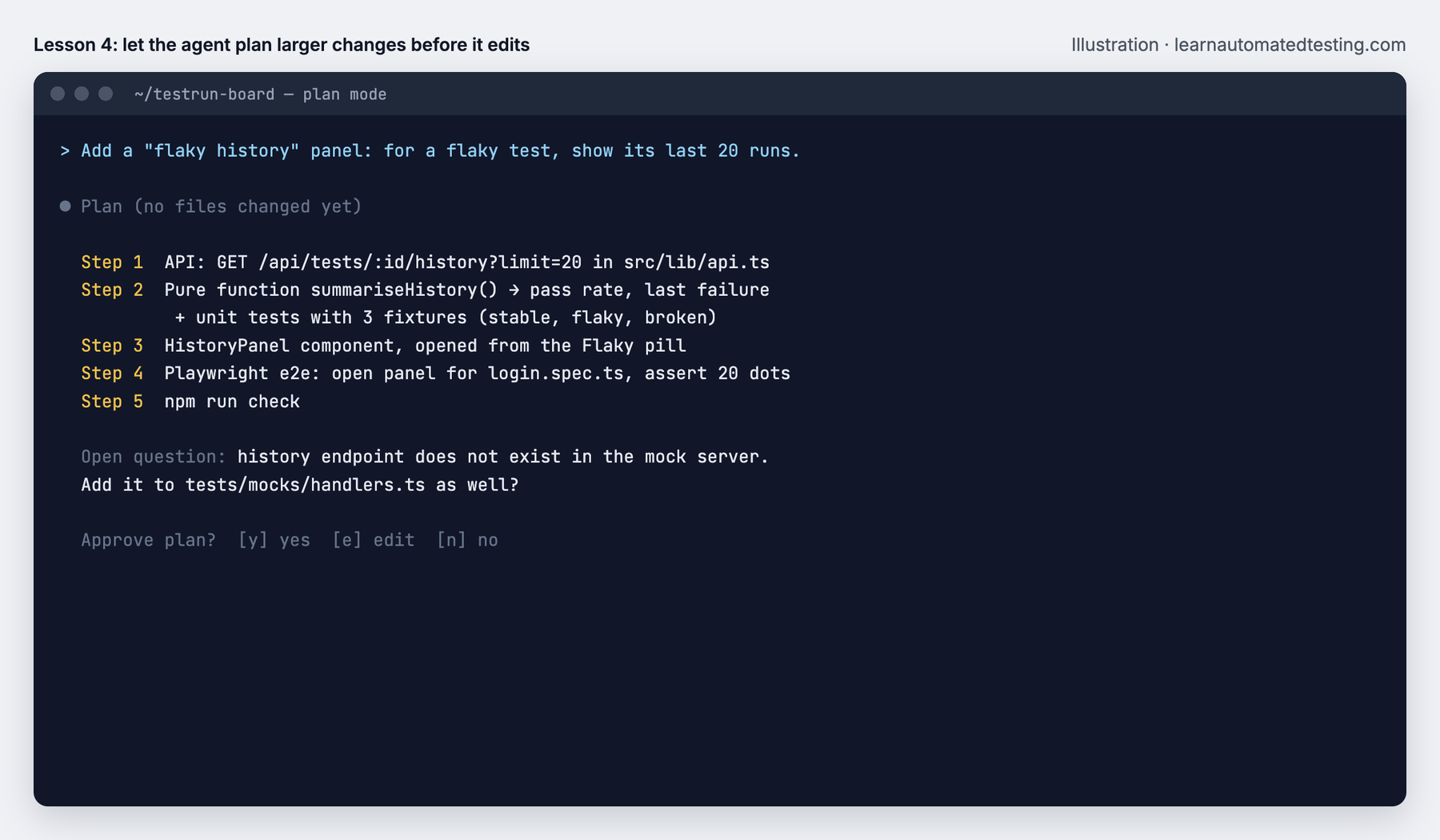
Look at what makes this plan reviewable:
- Ordered steps from the inside out: API, pure logic with unit tests, component, end-to-end test, full check.
- Tests are part of the plan, with named fixtures (stable, flaky, broken).
- An open question surfaces a missing piece (the mock endpoint) instead of silently inventing it.
How to review a plan
Ask yourself:
- Is the order right? Logic and tests before UI is usually safer.
- Is anything missing? Error states, empty states, loading, permissions.
- Is anything unnecessary? New dependencies, rewrites of working code.
- Are the open questions answered? Answer them explicitly before approving.
Then reply with corrections: “Step 2: also cover an empty history. Step 4: use the existing login.spec.ts fixture. Yes, add the mock handler.”
Watch how context changes the output
Run the same request twice: once in a repository without CLAUDE.md, once with the file from lesson 3, Context Architecture: CLAUDE.md, AGENTS.md and Rules. With good context, the plan uses your folder structure, your check command and your test style without being told. That difference is the return on the time you spend on context.
Grow in small, verifiable steps
Even with an approved plan, let the agent deliver step by step and check in between: “Do steps 1 and 2, run the unit tests and stop.” Each step ends with green tests and a diff you can read in a few minutes. If a step goes wrong you lose minutes, not an afternoon.
Hands-on
- Choose a change that touches at least three files in your project.
- Switch to plan mode and describe the outcome and the constraints.
- Review the plan with the four questions above and send one round of corrections.
- Approve, and let the agent implement the first two steps only. Review, commit, continue.
Walkthrough in TestRun Board
- Read
docs/specs/pass-rate-column.md. Note its open question: the API does not return history yet. - Switch to plan mode (Shift+Tab) and prompt: “Plan the implementation of docs/specs/pass-rate-column.md.”
- Review the plan against this list. A good plan for this spec:
- starts with the contract: a history endpoint in
docs/api.yaml, thennpm run generate:api; - mentions the add-api-endpoint skill or follows its steps (api.ts, mock handler, fixture, tests);
- puts
passRate()and sorting as pure functions with unit tests before the column; - answers or asks about the open question instead of inventing an endpoint silently;
- ends with
npm run checkand an e2e test for sorting.
- starts with the contract: a history endpoint in
- Send one round of corrections, for example: “Step 2: also cover ’n/a is always last’ when sorting descending.”
- Approve, but let it do only the contract and logic first: “Do steps 1 to 3, run npm test and stop.” The worked solution (
solution/lesson-16-pass-rate-column) follows exactly this order.
Key Takeaways
- Plan before editing when a change spans several files.
- A good plan is ordered, includes tests and surfaces open questions.
- Answer open questions explicitly; do not let the agent guess.
- Implement in small steps that each end green.