
Accessibility Tree Discovery: Smarter Page Snapshots for Selenium AI Agent
Selenium AI Agent MCP Server v2.3.0 Release Notes
We’ve replaced the flat element list with a hierarchical accessibility tree snapshot — the same structure screen readers use. This gives AI agents a semantic understanding of page structure instead of a raw dump of interactive elements.

Also in this release
- New
scroll_pagetool — dedicated scrolling by direction (up/down/left/right with configurable pixel amount) or by CSS selector (scroll-into-view). Replaces the old workaround of callingexecute_javascriptwithwindow.scrollBy. - Element model updates —
ElementInfonow carriesroleandlevelfields,discoverElements()returns both an element map and the full tree, andPageSnapshotincludes theAccessibilityNodehierarchy. - Bug fixes — deeply nested non-semantic wrappers (
<div>inside<div>inside<div>) are now correctly collapsed at all depths, element refs in drag/hover tools are resolved before acquiring the driver (fixing a potential race condition), and trailing comma consistency across tool schemas.
The Problem
The previous element discovery used CSS selectors (a, button, input, [role="button"], etc.) to find interactive elements and returned them as a flat list:
Interactive Elements:
  [e1] button: Play
  [e2] a: English 7,141,000+ articles
  [e3] a: 日本語 1,491,000+ 記事
  [e4] a: Deutsch 3.099.000+ Artikel
  ...
  [e17] a: العربية
  [e18] a: Deutsch
  [e19] a: English
  ... 84 language links eating up the ref budget ...
  [e100] a: Bahasa Banjar
This had three problems:
- No hierarchy — buttons inside a search form looked the same as buttons in a navigation bar
- No semantic roles — an
<a>tag could be a navigation link, a download button, or a skip link, but all showed asa: - Noise — Wikipedia’s 100+ language links consumed the entire 100-element budget, pushing footer links and form controls off the list entirely
The Solution: Accessibility Tree Snapshotting
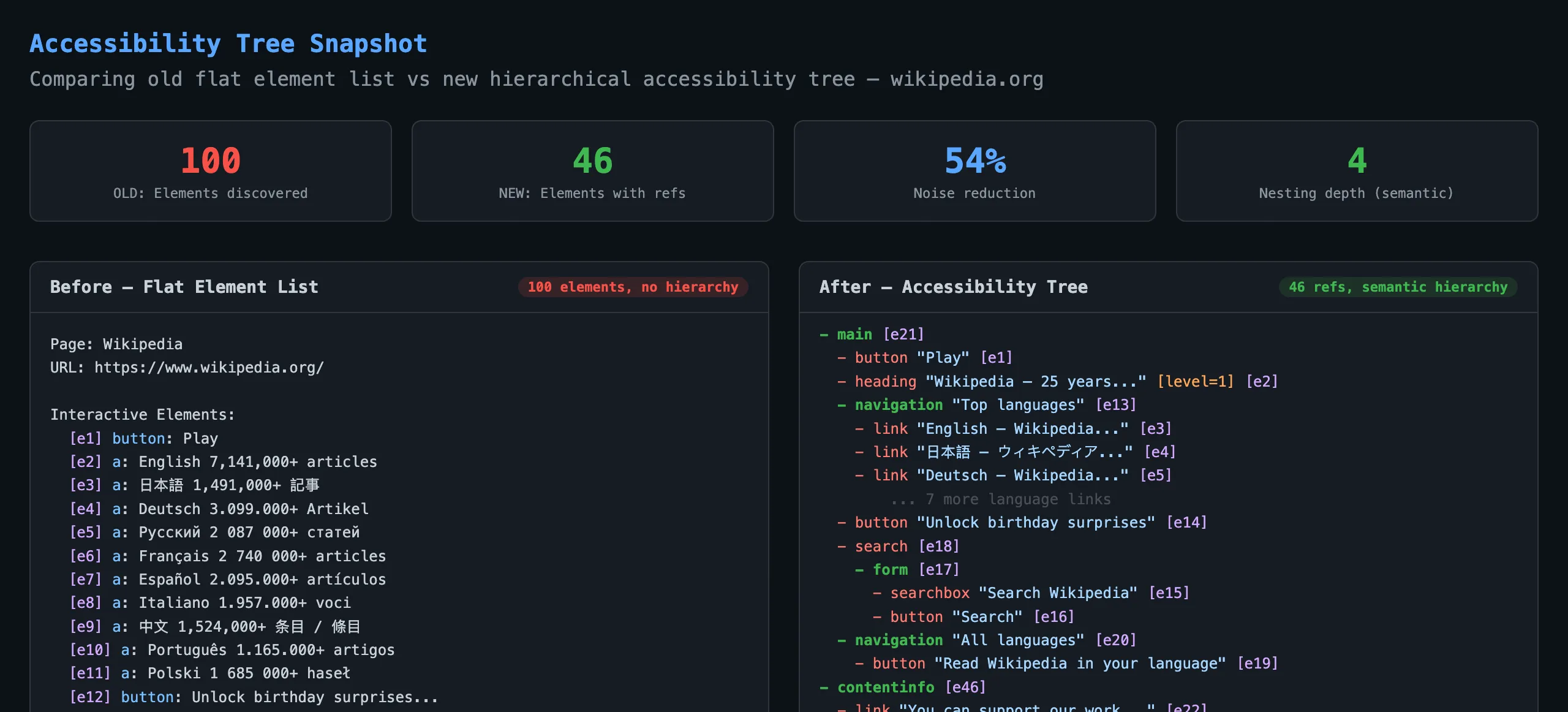
Instead of querying for interactive elements by CSS selector, we now walk the entire DOM tree recursively and build a computed accessibility tree — the same tree that screen readers and assistive technologies consume.
What changed
| Before | After | |
|---|---|---|
| Discovery method | querySelectorAll with CSS selectors | Recursive DOM walk computing ARIA roles |
| Output format | Flat list of interactive elements | Hierarchical tree with nesting |
| Element naming | HTML tag names (a, input, div) | ARIA roles (link, searchbox, navigation) |
| Ref budget | 100 elements, no prioritization | 200 elements, only meaningful nodes get refs |
| Structure | None | Landmarks, headings, lists, forms |
Before vs After
The difference is immediately visible when comparing the snapshot output for the same page.
Before: Flat Element List
Interactive Elements:
  [e1] button: Play
  [e2] a: English 7,141,000+ articles
  [e13] input: input
  [e14] select: Afrikaans Shqip العربية...
  [e15] button: Search
  [e16] button: Read Wikipedia in your language
  [e17] a: العربية          <-- 84 language links start here
  ...
  [e100] a: Bahasa Banjar    <-- budget exhausted, footer missing
No way to tell that the search input belongs to a search form, or that the language links are inside a navigation region.
After: Accessibility Tree
- main [e21]
  - button "Play" [e1]
  - heading "Wikipedia — 25 years..." [level=1] [e2]
  - navigation "Top languages" [e13]
    - link "English — Wikipedia..." [e3]
    - link "日本語 — ウィキペディア..." [e4]
    - link "Deutsch — Wikipedia..." [e5]
  - button "Unlock birthday surprises" [e14]
  - search [e18]
    - form [e17]
      - searchbox "Search Wikipedia" [e15]
      - button "Search" [e16]
  - navigation "All languages" [e20]
    - button "Read Wikipedia in your language" [e19]
- contentinfo [e46]
  - link "You can support our work..." [e22]
  - list [e28]
    - listitem > link "Google Play Store" [e24]
    - listitem > link "Apple App Store" [e26]
  - navigation "Other projects" [e42]
    - link "Commons — Free media..." [e29]
    - link "Wikivoyage — Free travel..." [e30]
  - link "Terms of Use" [e44]
  - link "Privacy Policy" [e45]
The AI agent can now see that searchbox "Search Wikipedia" is inside a search > form structure. It knows the language links are contained within navigation "All languages" and won’t waste refs enumerating all of them.
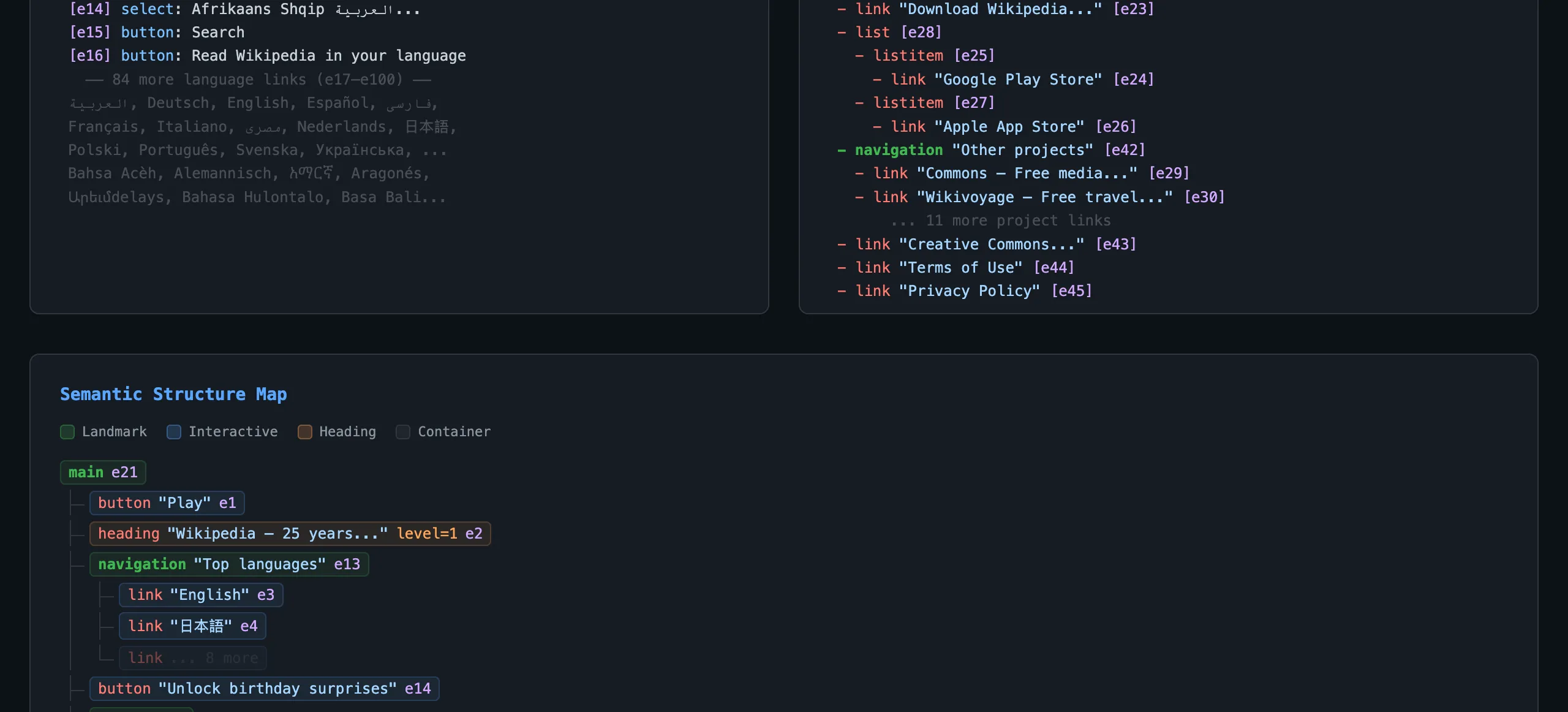
Semantic Structure Map
The tree maps directly to how the page is semantically structured — landmarks, interactive elements, headings, and containers each have distinct roles.

Node types
- Landmarks (green) —
main,navigation,search,contentinfo,form— the major regions of the page - Interactive (blue) —
button,link,searchbox,combobox— elements the agent can act on - Headings (orange) —
heading [level=1]through[level=6]— document structure - Containers (gray) —
list,listitem,group— grouping elements
How It Works
The discovery runs as a single executeScript call — no round-trips to the server per element. The browser-side JavaScript:
- Walks the DOM recursively starting from
<body>(or a scoped CSS selector) - Computes the ARIA role for each element using the implicit role map (e.g.,
<nav>becomesnavigation,<input type="search">becomessearchbox) with explicitrole=""attributes taking priority - Computes the accessible name following the W3C naming algorithm:
aria-label>aria-labelledby>alt>label[for]>placeholder>title> text content - Prunes non-semantic wrappers —
<div>and<span>elements with no role are collapsed, promoting their children up the tree - Assigns refs only to nodes that have a role AND a name (or are structural landmarks), keeping the ref budget efficient
- Returns both a flat element map (for ref resolution and clicking) and the hierarchical tree (for the snapshot text)
Changes Summary
New
- Accessibility tree discovery with ARIA role computation
- Hierarchical snapshot output replacing flat element list
AccessibilityNodetype for tree representationformatAccessibilityTree()utility for tree-to-text renderingScrollPageToolfor directional scrolling and scroll-into-viewroleandlevelfields onElementInfo
Changed
discoverElements()now returns{ elements, tree }instead of just a mapPageSnapshotincludestree: AccessibilityNode- Snapshot text uses tree indentation instead of flat list
- Element ref budget increased from 100 to 200
- Grid session and exploration coordinator updated for new discovery API
- Improved element text-matching fallback to include more semantic tags
Fixed
- Recursive flattening of
__promotenodes for deeply nested non-semantic wrappers - Trailing comma consistency across tool schema definitions
- Element resolution order in drag/hover tools (resolve refs before getting driver)