
The Real Cost of Legacy Test Automation Tools
Every few months I sit in a meeting where someone says: “We can’t switch tools, we’ve invested too much in this one.” Then the renewal invoice arrives and nobody in the room can say what the test automation actually costs per year, let alone per test.
This post is about that number. Not to argue that commercial tools are bad (some are excellent at what they do), but to show which costs never appear on the quote, and why the biggest one is the cost of leaving.
The license is the visible part
Most legacy test automation vendors do not publish a full price list. What you can find gives a sense of scale:
- SmartBear TestComplete: review sites list a starting price of about $1,210 per user per year. A reseller lists a fixed user subscription at $1,199, a floating license at $2,399 and the Pro bundle (desktop, web and mobile) at $4,799 to $7,799 per year. Parallel execution and the AI object-recognition engine are separate yearly add-ons.
- Ranorex Studio: about $4,650 per year for an Enterprise license and $650 per year per Runtime license that can only execute tests. One price tracker reports a median contract of around $21,865 per year, based on a handful of buyer reports.
- Tricentis Tosca: no public pricing. Third-party estimates start at €20,000+ per year, and €40,000 to €100,000+ for a mid-size team with several modules. On PeerSpot, users report anything from roughly €10,000 per license to about $1.4 million a year for around 200 licenses.
- OpenText UFT One: sales-led pricing; one reviewer puts it in the $5,000-a-year range. Running tests without editing them needs a separate UFT Runtime Engine license.
Treat these as orders of magnitude, not quotes: discounts, bundles and multi-year deals change them a lot. But notice the pattern. You pay per person who builds tests, and again per machine or agent that runs them.
A closer look at Tosca: paying for a platform, using one feature
First, to be clear: I am not against Tosca, or against other paid end-to-end test automation tools such as UFT One, TestComplete or Ranorex. For end-to-end testing of SAP, Salesforce, desktop or other packaged enterprise applications, with business testers who do not write code, they can be the right choice and worth their price. The problem is not the tools. The problem is buying it without a clear purpose, or keeping it after that purpose has gone.
AI is changing that picture, though. The strongest argument for Tosca and similar paid tools was always that people who do not code could still automate tests. Today a business tester can describe a scenario in plain language and let an AI assistant, connected to a real browser through MCP, turn it into readable Playwright or Selenium code. API tests in particular are now quick to generate from an OpenAPI spec or a few example requests. That does not make these tools obsolete, but the set of situations where only a no-code or low-code platform will do is getting smaller every year, and that is worth weighing at every renewal.
Tosca deserves its own section, because it shows the cost problem most clearly. It is a broad platform: model-based UI automation for packaged applications like SAP and Salesforce, test case design, test data management, service virtualization and, through Tricentis, RPA-style automation. Pricing follows that breadth. Third-party estimates describe separately licensed capabilities, with add-ons such as mobile, extra execution agents and test data management each adding thousands of euros per year, and users on PeerSpot mention a minimum one-year term with a push towards three-year contracts.
I have worked on two Tosca projects, and in both the same thing made it expensive in practice: the teams used Tosca mostly for API testing. Hardly any SAP flows, model-based UI automation or RPA. Mainly REST calls with assertions, built in Tosca’s own modules and stored in Tosca’s own repository.
In one of them I migrated the API tests to .NET, successfully. The tests are now plain code in the team’s own repository, readable by every developer and running in the normal pipeline, without a Tosca license behind them.
That is the worst position to be in:
- You pay platform prices for a commodity feature. API testing is exactly the area where free, mature tools are strongest: Playwright’s API testing, REST Assured, Postman or Bruno collections, and contract testing with Pact.
- The skills do not transfer. Testers learn Tosca’s way of modelling an API call instead of HTTP, JSON and code that every developer on the team can read and review.
- The tests live outside the codebase. API tests are the easiest tests to keep next to the service they test, run on every pull request and fix in the same commit as the change. In a separate tool and repository they drift away from the code.
- The exit cost still grows. Every API test added makes the renewal harder to say no to, even though each one could have been a few lines of code.
So use Tosca, and any other paid end-to-end tool, for what it is built for. If your team uses one of them for only one capability, list which modules you actually use and what each costs. That single exercise often makes the renewal decision for you: keep it where it earns its price, and move the rest to tools that fit.
The costs that never appear on the quote
1. Execution capacity
Running tests costs money in every stack. In Azure DevOps, for example, each extra Microsoft-hosted parallel job is $40 per month and each extra self-hosted one $15 per month, plus the VMs behind self-hosted agents. Open-source stacks pay that too. The difference is that many commercial stacks charge licenses on top: runtime licenses, extra execution agents or a parallel-testing add-on, for every machine that runs tests. The result is that teams ration parallelism. A suite that could run in 10 minutes on eight workers runs for an hour on two, and that delay is paid by every developer waiting for feedback, every day.
2. Modules and add-ons
SAP support, mobile, API testing, test data management, service virtualization, AI-based object recognition: in several tools these are separately licensed. The base license gets you in; the modules you actually need decide the bill.
3. Infrastructure
Many legacy tools are Windows-only and expect full desktop sessions on virtual machines, often with a license server. That means Windows VMs that stay up, patching, and someone who knows how the license server behaves when it is unreachable at 2 a.m. during a nightly run.
4. Skills that only work in one tool
Vendor-specific scripting, model formats and certifications are knowledge that does not transfer. You pay for it twice: in training (some tools recommend weeks of formal training per person) and in hiring, because the pool of people who know your exact tool is small and expensive. Meanwhile the job market moved on: Playwright and Selenium skills are what most testers now build.
5. Maintenance on the vendor’s schedule
Upgrades, deprecated features and changed license models arrive when the vendor decides. If a new browser version breaks the tool’s recognition engine, your pipeline waits for the vendor’s fix.
6. Exit cost: the one nobody budgets
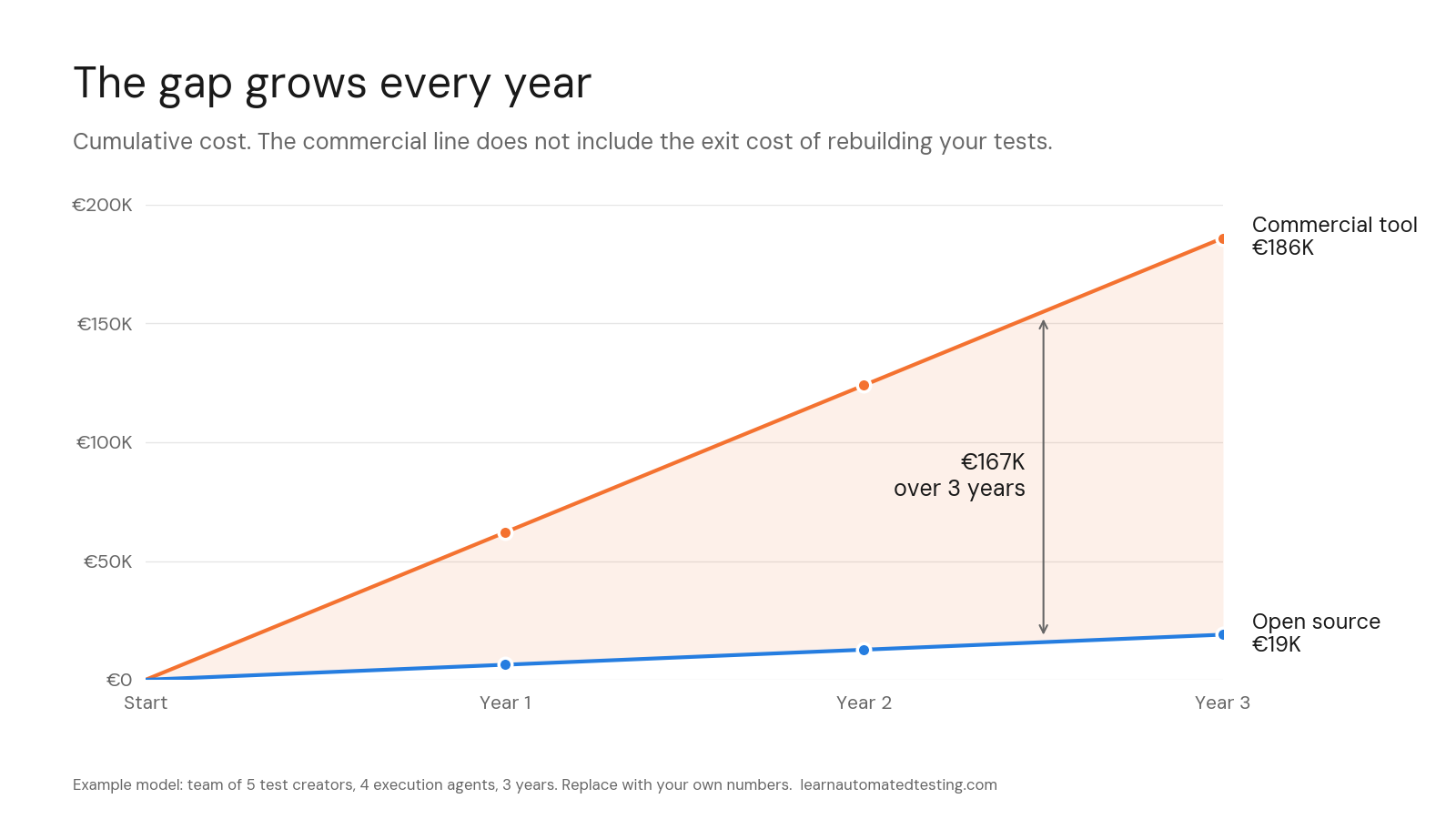
This is the big one. Your tests are stored in a format only that tool can run. After five years you may have thousands of test cases, objects and data sets that represent real business knowledge. The moment you want to leave, you have to rebuild all of it, so the renewal is effectively priced against your switching cost, not against the value you get. That is lock-in, and it is the real cost of a legacy tool.
A 3-year example for a 5-person team
To make this concrete, here is a simple model. The numbers are example assumptions to show the structure, not a quote for any specific tool. Replace them with your own.
| Cost item (3 years) | Commercial tool | Open-source stack (Playwright/Selenium) |
|---|---|---|
| Licenses: 5 creators × €8,000/year | €120,000 | €0 |
| Runtime/execution licenses: 4 agents × €1,500/year | €18,000 | €0 |
| Add-on modules | €15,000 | €0 |
| CI execution: 4 Azure DevOps parallel jobs (~$40/month each) | €5,000 | €5,000 |
| Test machines (Windows VMs and license server vs. Linux agents) | €13,000 | €4,000 |
| Training and certification | €15,000 | €10,000 |
| Total | €186,000 | €19,000 |
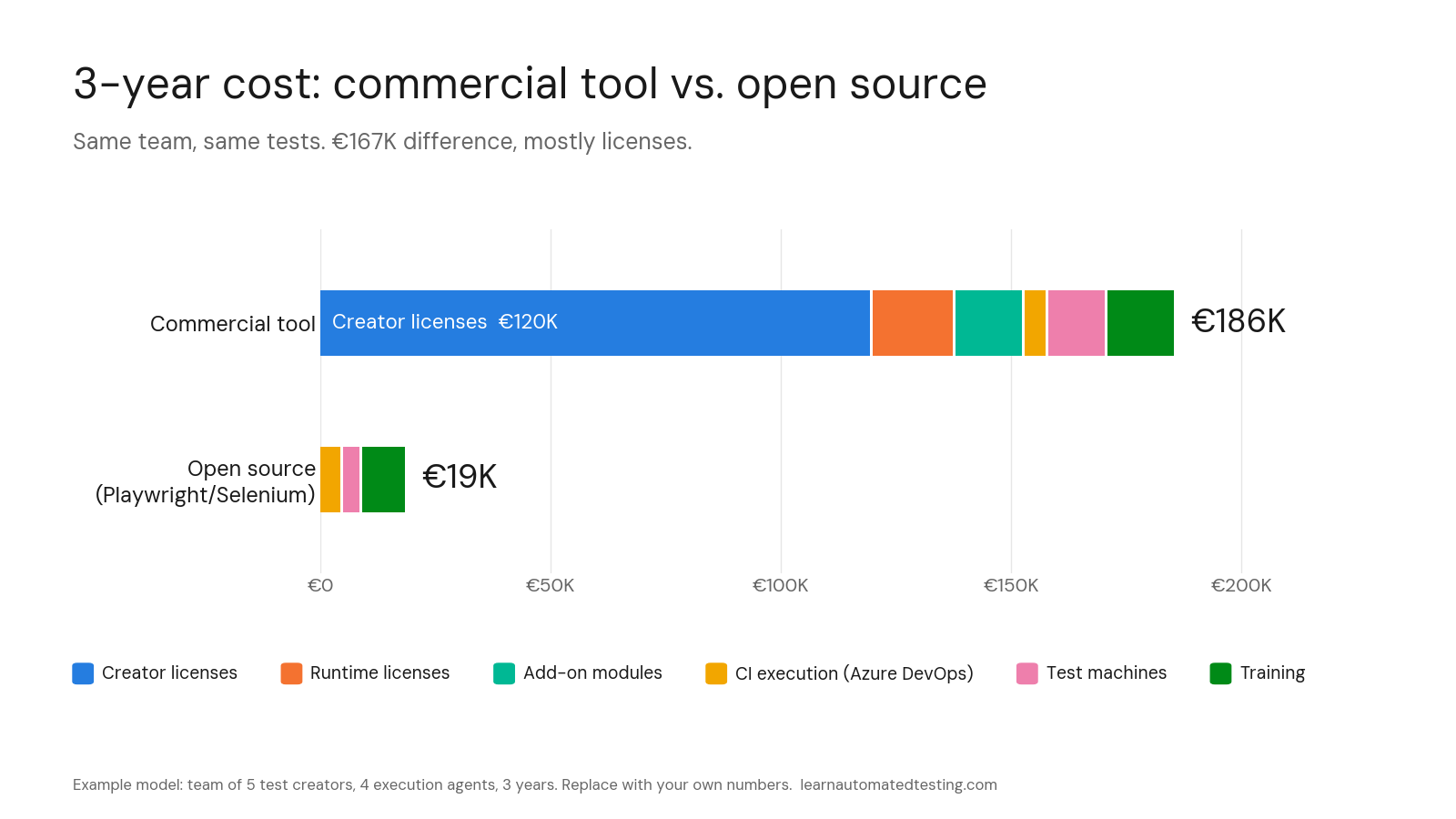
The open-source column is not free. It needs engineers who can code, a framework that someone owns, and discipline in CI. In most teams that cost sits in salaries you pay either way. It also pays for execution: pipelines, parallel jobs and agents cost the same whichever tool runs on them. What it does not have is a license fee on top of that for every tester and every execution agent, and it has no exit cost: Playwright or Selenium tests in your own Git repository stay yours.
When a commercial tool is still worth it
Being fair matters here, because there are real cases:
- Packaged enterprise applications such as SAP or Oracle, where a vendor’s dedicated modules save months of work.
- Old desktop technologies and mainframes that open-source tools do not reach well.
- Teams with no coding capacity at all, where a recorder is the only realistic way to automate anything. (This one is shrinking fastest: with AI assistants, testers who do not code can now produce and maintain code-based tests.)
- Regulated environments that need vendor support contracts and audit trails out of the box.
If one of these is your situation, the question is not “commercial or open source” but “do we still control our test assets?”
How AI changed the migration math
The reason teams stayed was that migration meant rewriting everything by hand. That changed. With AI assistants and MCP-based browser automation, converting test cases, generating page objects and fixing locators is now a fraction of the effort it was. I covered the approach in detail in Migrating from Paid Test Tools to Open Source with AI, and tools like selenium-ai-agent let an AI drive a real browser to rebuild flows against the live application.
That does not make migration free. It makes it a project you can plan and budget in weeks, instead of a multi-year rewrite nobody dares to start.
Your exit strategy, before you need it
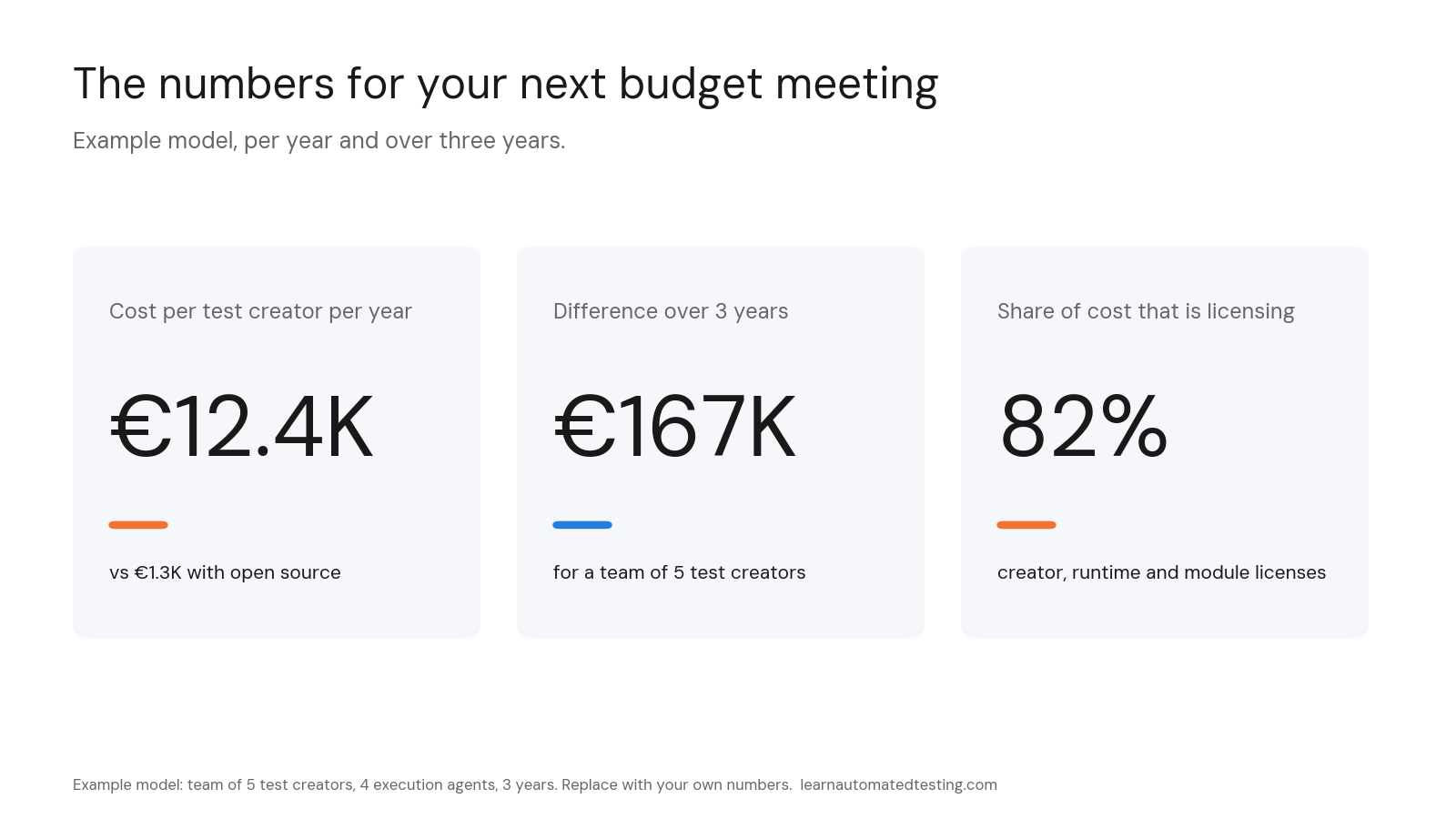
If you need to make the case to management, this is the summary to take into the room (again: replace the example numbers with your own):
Whatever tool you use today, these steps keep the switching cost under control:
- Know your real number. Add up licenses, runtime, modules, infrastructure and training per year, then divide by the number of tests you actually run. Cost per test is the figure that ends discussions.
- Keep business knowledge outside the tool. Test cases, test data and acceptance criteria belong in your own repository or test management, in a readable format.
- Prefer tools that export. Ask vendors directly: can I export my tests as code or in an open format? If the answer is vague, that is your answer.
- Start new work in open frameworks. You do not have to migrate everything at once. New features in Playwright or Selenium, legacy flows in the old tool until they are replaced.
- Pilot a migration on one flow. Take one critical end-to-end flow, rebuild it with AI assistance, and measure the hours. That gives you a real estimate instead of a fear.
- Time it with the contract. Plan the pilot six months before your renewal date, so the decision is made on data, not under deadline pressure.
The most expensive test automation tool is not the one with the highest license fee. It is the one you can no longer afford to leave.
Ralph van der Horst
Test automation consultant and builder of selenium-ai-agent and Robotyxx. Writes about AI, test automation and RPA from hands-on project work. More about me →
Related articles
- Claude Skills for Maintaining Playwright and Selenium Tests
How Claude Skills capture your framework conventions so AI can generate, heal and maintain Playwright and Selenium tests consistently at …
- Playwright-Style Test Agents for Selenium: An R&D Experiment
Exploring whether the Playwright Test Agent concept could be recreated for Selenium with multi-language support.
- Migrating from Paid Test Tools to Open Source with AI
Discover how AI reduces test automation migration costs by 60%, enabling affordable transitions from commercial tools to open-source …