
We Moved Our Playwright Tests Off GitHub Actions to a European Serverless Cloud. Here's What Happened.
Short version: running Playwright on Scaleway serverless costs about 5–8× less per run than GitHub Actions and keeps your data in Paris. The price is speed: each test is roughly 6× slower, and a cold start can add three minutes.
Most teams run their Playwright tests on GitHub Actions, and for good reason. It is one YAML file and it just works. But on a private repository every minute is billed, and the bill grows with every test you add.
So we tried something different. We moved the same Playwright suite to Scaleway, a French cloud provider, and triggered it from GitHub without using a single GitHub Actions minute. Results still come back to GitHub as a normal pass/fail check on the commit.
We measured everything, including the parts where serverless turned out slower. This post walks through the setup, the pitfalls, the numbers and the costs, so you can decide whether it makes sense for your team. The full code is on GitHub: learn-automated-testing/scaleway-playwright.
What we built
A GitHub App sends a webhook to a small Scaleway function, which starts the tests and reports back to GitHub as a native check.
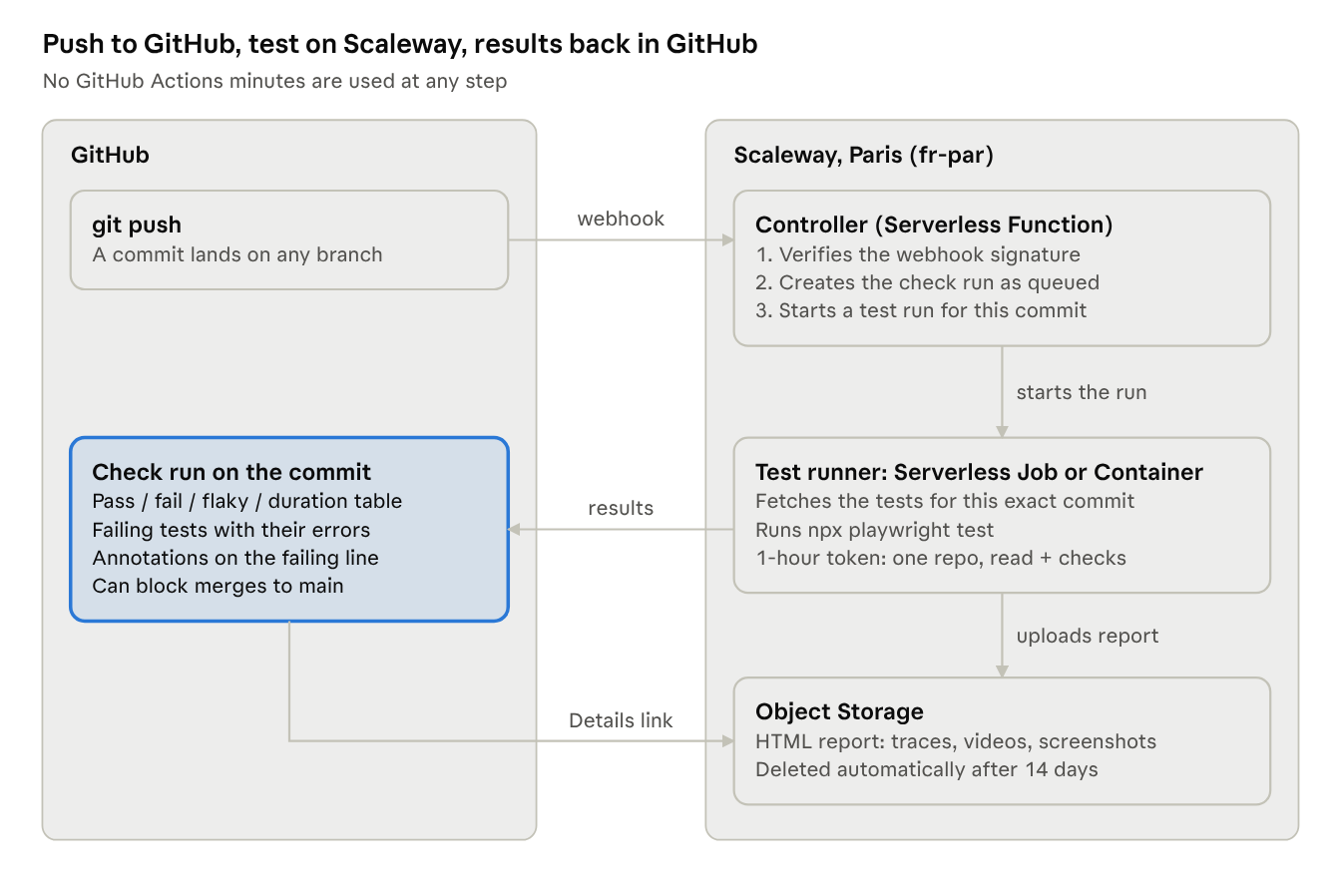
A few design choices make this work well in practice:
- A GitHub App instead of Actions. Webhooks are free, and results still appear as native checks you can require before merging.
- Tests are not baked into the image. The image holds only Node, Chromium and npm packages. Tests are fetched per commit, so changing a test never needs a rebuild.
- The image tag is a hash of the
Dockerfile,package*.jsonandscripts/, so the image is only rebuilt when dependencies change. - Short-lived tokens. Each run gets a one-hour token limited to one repo (
contents:read,checks:write). No long-lived secrets reach the runner. - Reports on Object Storage, public-read under a random path, so the Details link opens in the browser. The bucket itself stays private.

Each run gets its own report folder in Object Storage: the short commit SHA plus a random ID.
How to build it, step by step
You need a Scaleway account with the scw CLI, Docker, Node.js 22+, a GitHub repo with Playwright tests, and admin rights on the GitHub organization.
1. Make the Playwright project pipeline-friendly
Use stable locators (data-testid, roles). Here is one of our tests against practiceautomatedtesting.com:
test('adding a product updates the cart', async ({ page }) => {
  await page.goto('/shopping');
  const cart = page.getByTestId('cart-button');
  await expect(cart).toContainText('0 items');
  await page.getByTestId('add-to-cart-9').click();
  await expect(cart).toContainText('1 item');
});
Add a JSON reporter next to the HTML one, so the pipeline can read the results and report them back to GitHub:
reporter: [
  ['list'],
  ['html', { open: 'never', outputFolder: 'playwright-report' }],
  ['json', { outputFile: 'playwright-report/results.json' }],
],
2. Build a slim runtime image
The official Playwright image ships Chromium, Firefox and WebKit, about 2 GB. Ours holds only Chromium, about 1.3 GB. A smaller image means faster cold starts.
FROM node:22-bookworm-slim
WORKDIR /app
ENV CI=true PLAYWRIGHT_BROWSERS_PATH=/ms-playwright
RUN apt-get update && apt-get install -y --no-install-recommends curl ca-certificates \
 && rm -rf /var/lib/apt/lists/*
COPY package.json package-lock.json ./
RUN npm ci && npx playwright install --with-deps --only-shell chromium
COPY scripts ./scripts
ENTRYPOINT ["./scripts/entrypoint.sh"]
The entrypoint marks the GitHub check as in progress, downloads the tests for GIT_SHA, runs npx playwright test, uploads the report and completes the check. A trap marks the check as failed if anything crashes on the way.

The image in Scaleway Container Registry. The deps-… tag is the dependency hash, so a test change never triggers a rebuild.
3. Create the Scaleway resources
cp .env.example .env
./scaleway/ensure-job.sh                          # registry + image + Serverless Job
./scaleway/setup-bucket.sh <your-bucket-name> 14  # report bucket + 14-day lifecycle
Create an API key for report uploads with ObjectStorageFullAccess. Not ObjectStorageBucketPolicyFullAccess: that one only manages bucket policies, and every upload fails with AccessDenied.
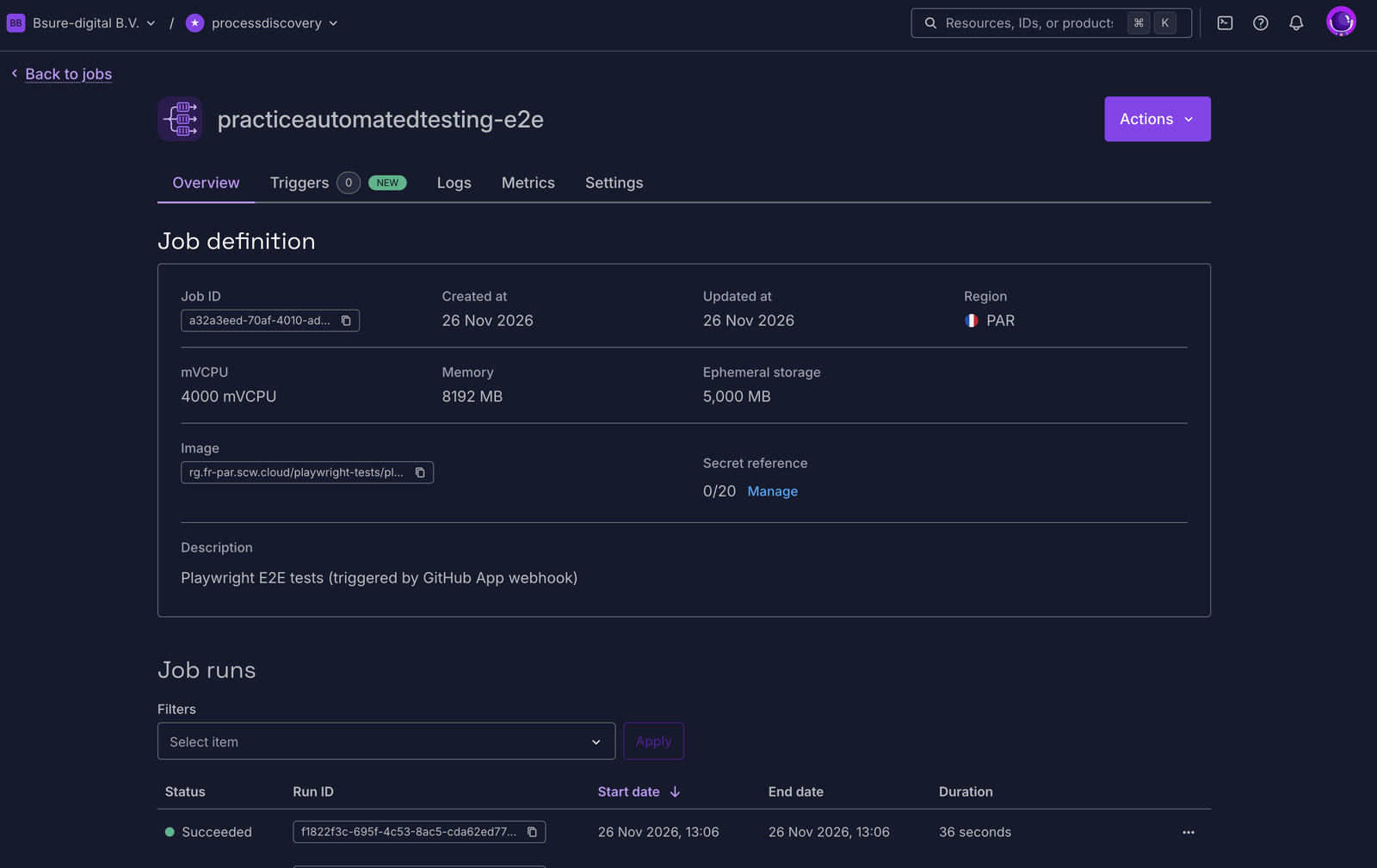
The Serverless Job in the Scaleway console, sized at 4 vCPU and 8 GB in Paris.
4. Create the GitHub App
Organization settings → Developer settings → GitHub Apps → New GitHub App.
| Setting | Value |
|---|---|
| Webhook URL | Placeholder for now, set in step 5 |
| Webhook secret | openssl rand -hex 32 |
| Repository permissions | Checks: Read & write · Contents: Read-only |
| Events | Push, Check run, Check suite |
| Installable on | Only this account |
Generate a private key (.pem) and install the app on the repository. Two warnings:
- Create the app under the organization that owns the repo. A personal app set to “only this account” cannot be installed on org repos (you can transfer it under App settings → Advanced).
- Never make the app public. Anyone could install it and start paid test runs on your account. As a second line of defense, the controller refuses any repo not listed in
ALLOWED_REPOS.
5. Deploy the controller
./scaleway/deploy-controller.sh
# → Webhook URL for your GitHub App: https://<id>.functions.fnc.fr-par.scw.cloud
Paste that URL into the GitHub App and push a commit. Within seconds, Playwright E2E (Scaleway) appears on the commit.
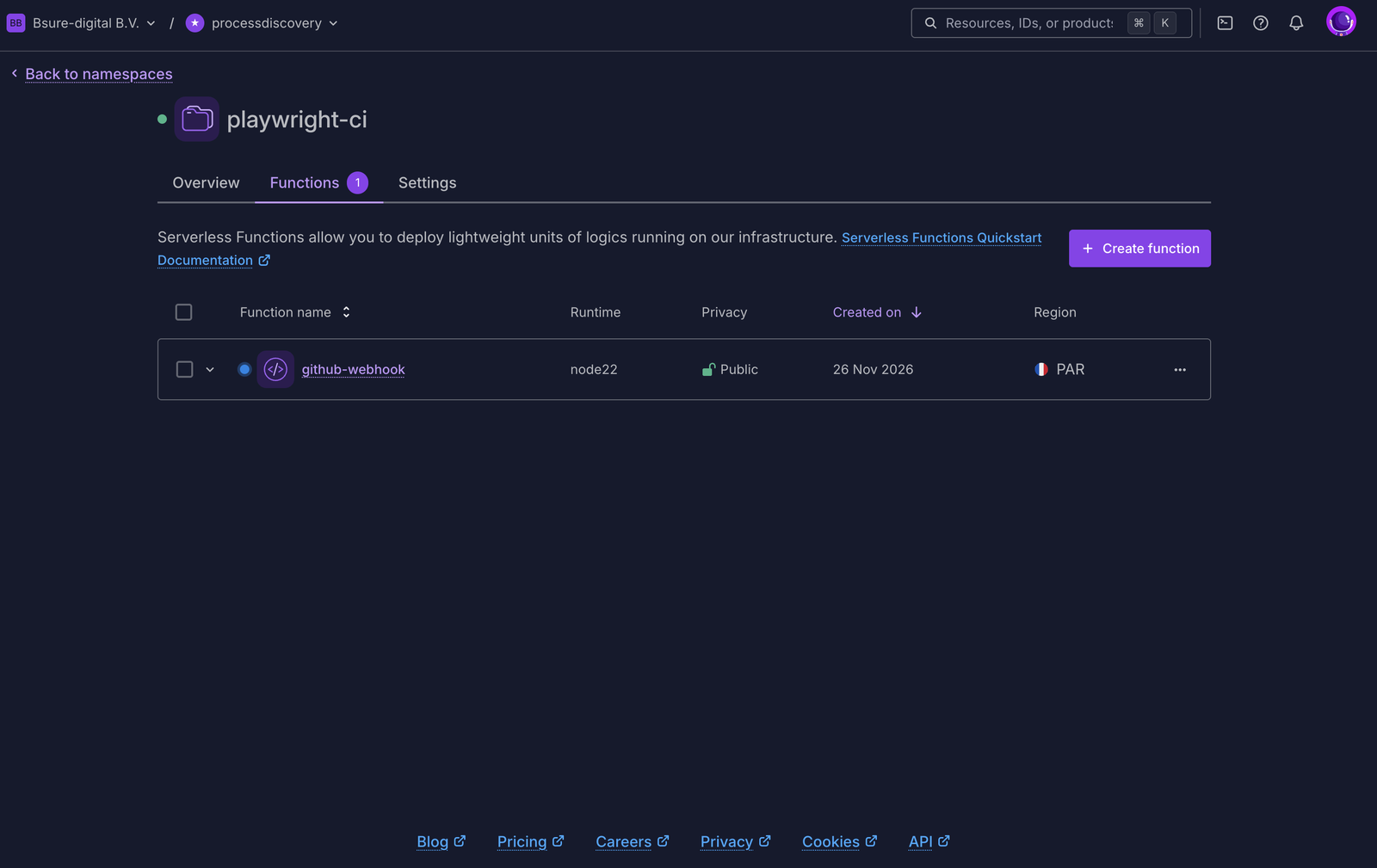
The controller: one small Node 22 function in Paris.
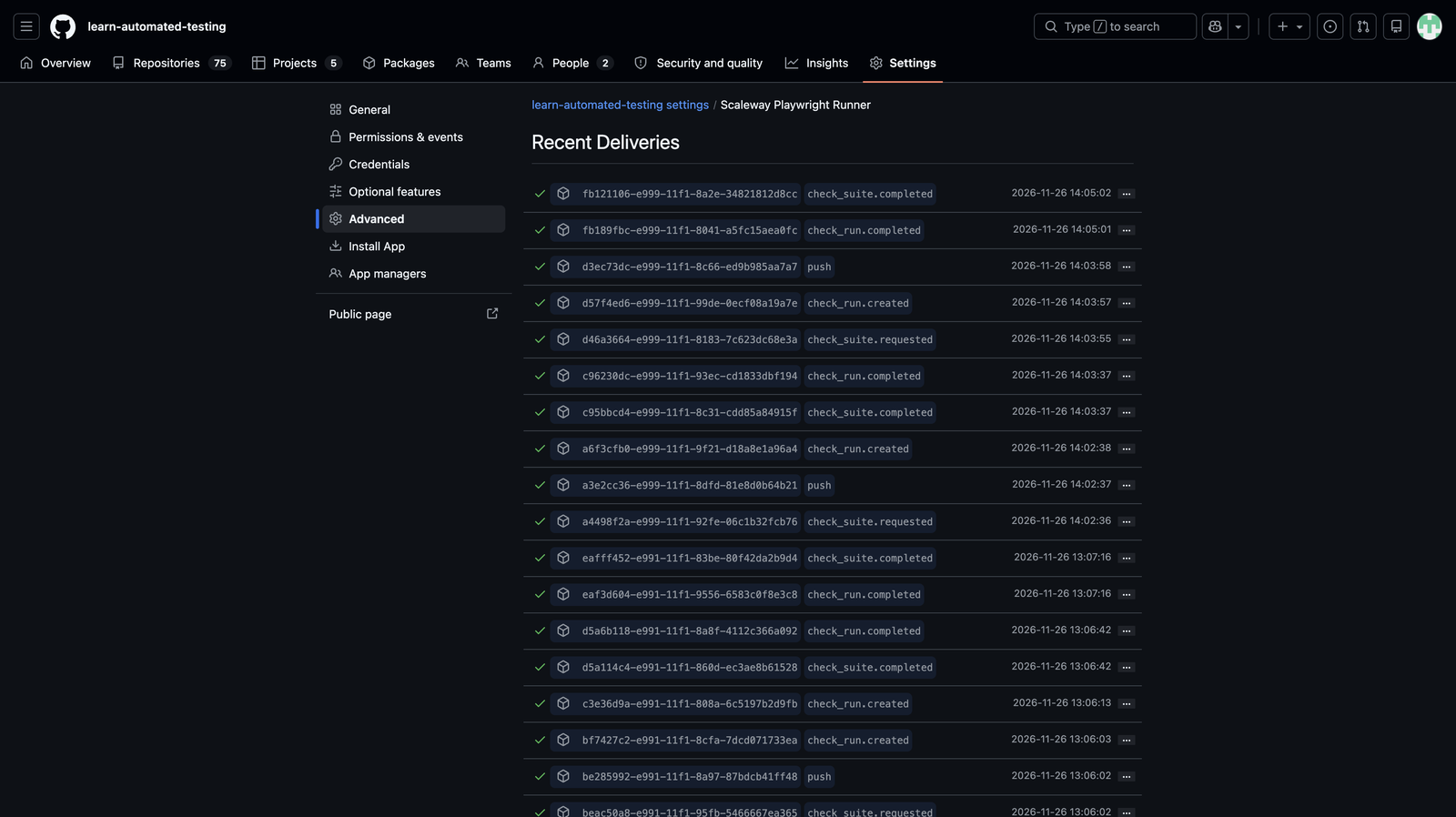
The GitHub App’s Recent Deliveries. A push at 14:03:58 leads to a completed check run at 14:05:01.
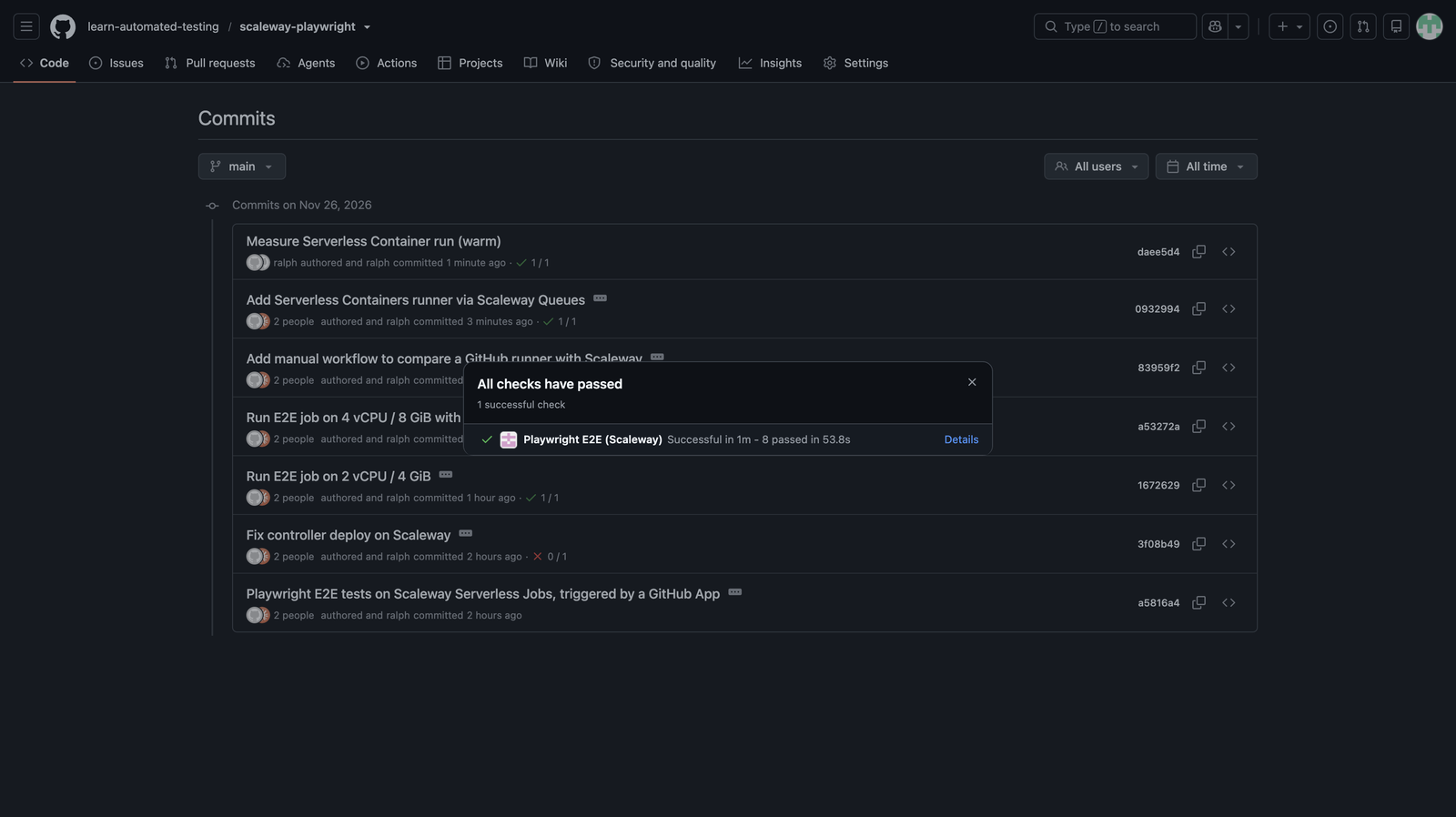
The result on the commit, like any other GitHub check.
6. Optional: use a Serverless Container instead of a Job
./scaleway/deploy-container.sh
This enables Scaleway Queues, deploys the same image as a Serverless Container with a queue trigger, and switches the controller to RUNNER=container. Set RUNNER=job and redeploy to switch back.
7. Block merges on red tests
Repository → Settings → Branches → protection rule for main → Require status checks to pass → add Playwright E2E (Scaleway).

Every commit now carries the Scaleway check. The red cross is the controller deploy we fixed in the next commit.
Seven pitfalls we hit so you don’t have to
The 1-vCPU timeout cost us the most time: tests that passed locally in 5 seconds timed out at 30 seconds on Scaleway.
| Symptom | Cause | Fix |
|---|---|---|
A reserved environment variable is used | Scaleway reserves SCW_* names | Use your own names (JOBS_SECRET_KEY, REPORT_REGION) |
Function returns 500: require is not defined in ES module scope | Scaleway’s Node 22 runtime treats .js as ES modules | Use import/export and add {"type":"module"} |
| Tests time out at 30 s, pass locally in 5 s | With 1 vCPU and no GPU, Chromium renders everything on the CPU | At least 2 vCPU; one Playwright worker per vCPU |
| Job waits up to ~3 min before starting | Jobs scheduler + image download on a cold machine | Smaller image, accept it, or use Serverless Containers |
Report upload AccessDenied | Wrong permission set on the API key | ObjectStorageFullAccess |
| Webhook: “failed to connect to host” | Webhook URL was still the placeholder | Set the real URL, then Redeliver the push under Recent deliveries |
scw ... wait silently fails | Not every resource has a wait command | Poll the status yourself |
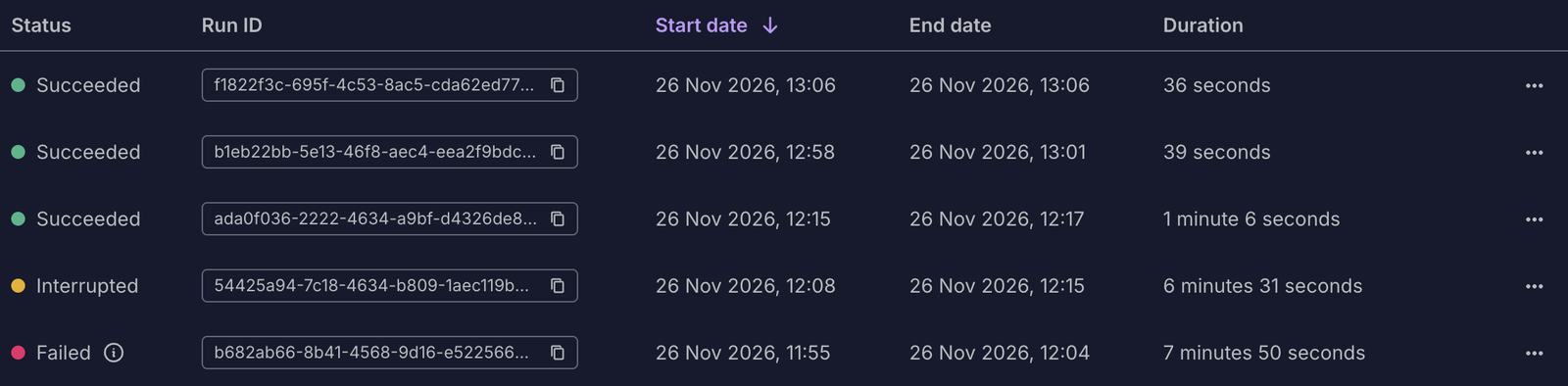
The Job’s run history tells the same story: a failed run, an interrupted one, then 66 s, 39 s and 36 s. The 12:58 run ran for 39 s but only finished at 13:01: that gap is the cold start.
The numbers: cheap, but slower per test
A warm Scaleway job returned a result faster than GitHub, in about 36 seconds against about a minute. A cold one took about 3.5 minutes.
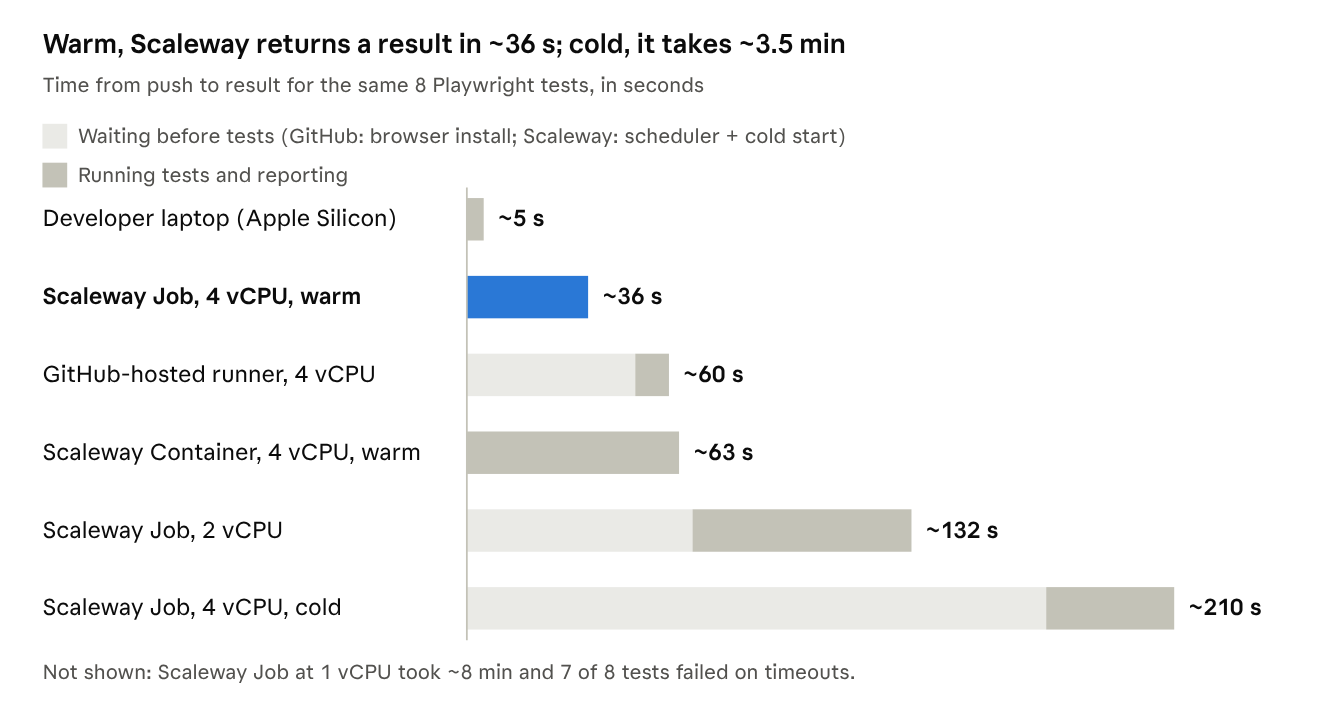
Our measurements, November 2026 · 8 tests against practiceautomatedtesting.com
We ran the same 8 Playwright tests (home, web elements, shopping) against practiceautomatedtesting.com on every setup. Three things stood out.
- Serverless CPUs are slow for browsers. Without a GPU, Chromium renders on the CPU. One test took about 13 s on Scaleway against about 2 s on a GitHub runner with the same 4 vCPUs, and 0.6 s on a laptop. Adding vCPUs runs more tests in parallel, but doesn’t make a single test faster.
- Setup time matters as much as test time. A GitHub runner spends about 50 s per run installing the browser. The Scaleway image already contains it, which is why a warm Scaleway run still wins overall.
- Cold starts are the real annoyance. A warm Serverless Job starts immediately; a cold one waited almost 3 minutes.
The GitHub measurement was on a public repo with 4 vCPUs. Private repos get 2-vCPU runners, so expect GitHub to be slower there. The Serverless Container runner (warm, 4 vCPU) took about 63 s from push to result, 53.8 s of it running tests: no faster than a warm Job for this suite.
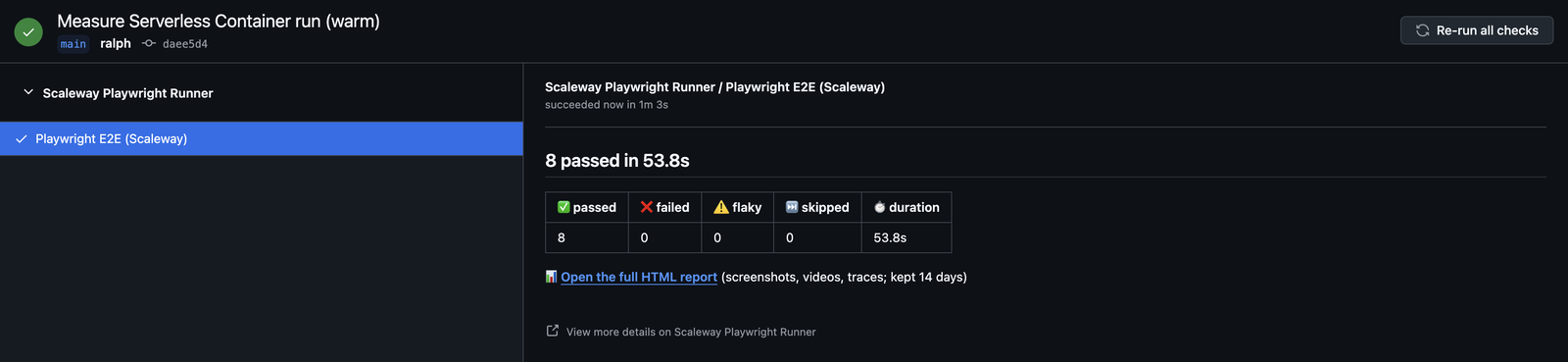
The check run summary GitHub shows for each commit, with a link to the full report.
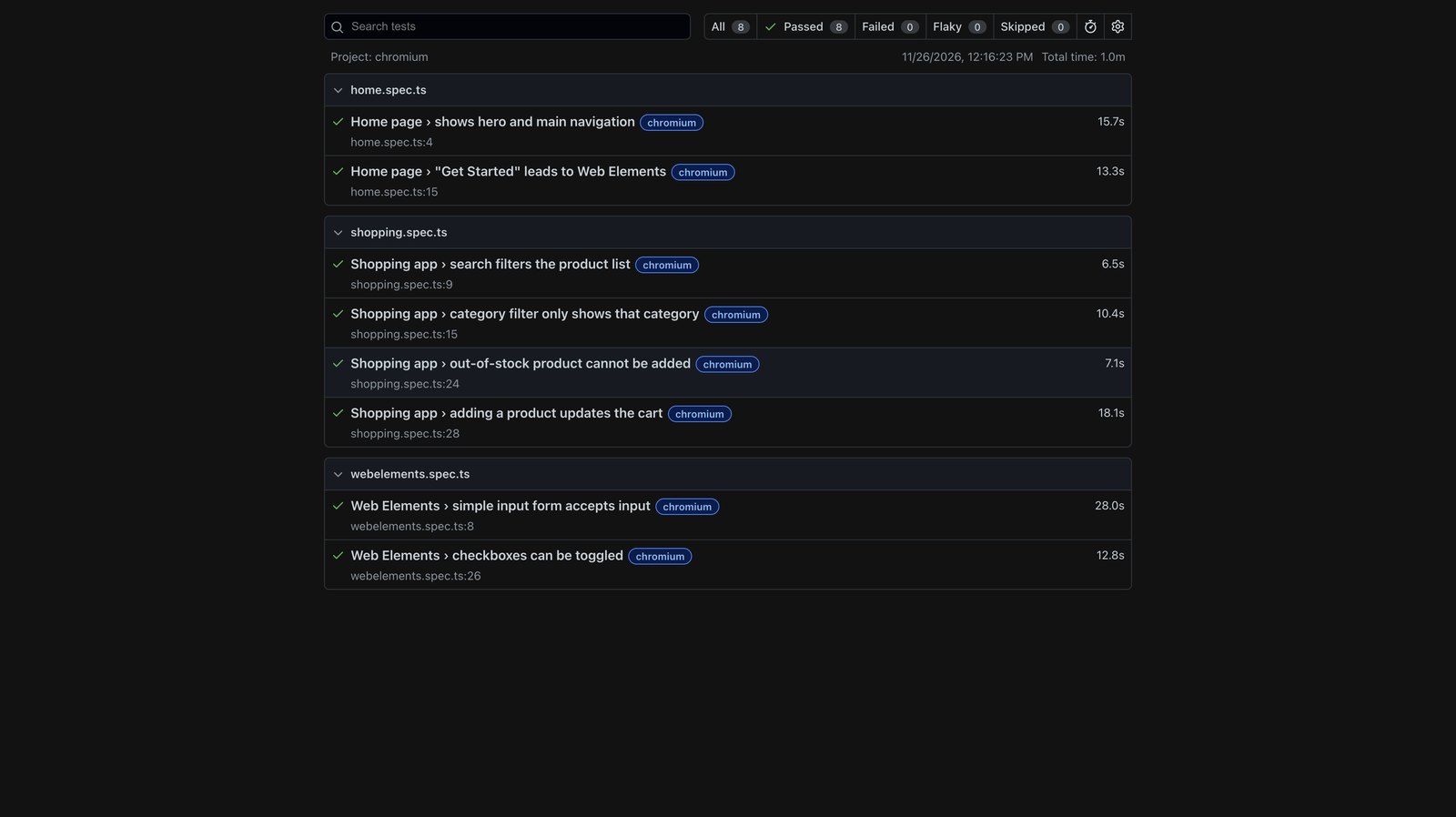
The Playwright HTML report from a 2-vCPU run. Each test took 6.5–28 s, against about 2 s on a GitHub runner.
The costs: a fraction of a cent per run
One run of our suite costs about $0.012–0.018 on GitHub Actions and €0.0018–0.0022 on Scaleway. Prices are from November 2026, excluding VAT; always check the providers’ pricing pages.
| GitHub Actions (Linux 2-core) | Scaleway Serverless Jobs / Containers | |
|---|---|---|
| Rate | $0.006 per minute, rounded up per job | €0.00001 per vCPU-second + €0.000002 per GB-second |
| Free tier | Unlimited on public repos; included minutes on private plans | 200,000 vCPU-s + 400,000 GB-s per month |
| One run of our suite | ~2–3 billed minutes ≈ $0.012–0.018 | 66 s at 2 vCPU / 4 GB ≈ €0.0018 · 39 s at 4 vCPU / 8 GB ≈ €0.0022 |
| Runs inside the free tier | — | ~1,250–1,500 per month |
Two things drive the gap. Scaleway bills per second and nothing when idle, while GitHub rounds up to the minute. And on GitHub you also pay for setup: npm ci and the browser install, every run.

Scaleway’s own estimator for this job: about €6 a month even if it ran a full hour every day, before the free tier.
What that means for a team spending $120 a month
$120 buys about 20,000 Linux minutes on GitHub Actions. The same workload on Scaleway lands around €20–31.
| Item | Estimated monthly cost |
|---|---|
| GitHub Actions, as is | $120 |
| Scaleway serverless, same workload | ≈ €20–31 (before subtracting the GitHub setup minutes you no longer pay for) |
| Object Storage for reports (14-day retention) | < €0.01 |
| Controller function | €0 (within the free tier) |
The verdict: it depends on your repo and your volume
For a public repo, stay on GitHub Actions. For a private repo where cost or EU data residency matters more than a fast feedback loop, Scaleway serverless is a strong option.
GitHub Actions wins on simplicity and speed. It is one YAML file, free and fastest on public repos, and comes with logs, re-runs, artifacts, approvals and a huge ecosystem of actions. The downsides: every private-repo minute is billed (setup included), billing rounds up per job, private repos get smaller 2-vCPU runners, and your infrastructure and data sit with a US provider.
Scaleway serverless wins on cost and sovereignty. It is about 5–8× cheaper per run, billed per second, often free within the free tier, and runs in Paris (fr-par), which helps with GDPR. Results still show up as native GitHub checks, with no per-run setup and no image rebuild when a test changes. The downsides: slower tests, cold starts, more moving parts (App, function, job, bucket, IAM), logs in Scaleway Cockpit instead of GitHub, and glue code you maintain yourself.
| Your situation | Our recommendation |
|---|---|
| Public repository | GitHub Actions: free and fast |
| Private repository, low to medium volume | Scaleway serverless: very cheap, accept slower runs |
| Private repository, high volume, speed matters | Self-hosted GitHub runner on a dedicated-CPU server: fixed monthly price, no cold starts |
| EU data residency required | Scaleway: serverless, or a dedicated Instance |
What’s next
Three experiments are next on our list:
- A deploy pipeline: deploy to test → Scaleway e2e tests → on green, trigger a GitHub Actions workflow (
workflow_dispatch) that deploys to acceptance, gated on the e2e check of that exact commit. - Faster tests on serverless: disable CSS animations and transitions during tests, and block third-party trackers.
- A self-hosted runner on a dedicated-CPU server, for teams with high volume.
Have you tried running browser tests on serverless infrastructure? We would love to hear what you measured.
Sources
Ralph van der Horst
Test automation consultant and builder of selenium-ai-agent and Robotyxx. Writes about AI, test automation and RPA from hands-on project work. More about me →
Related articles
- Playwright-Style Test Agents for Selenium: An R&D Experiment
Exploring whether the Playwright Test Agent concept could be recreated for Selenium with multi-language support.
- Parallel Test Execution in Playwright: Workers and Sharding
Cut Playwright suite runtime by up to 70-80% with workers, fullyParallel and sharding across CI machines, from a basic setup to advanced …
- From Code to Content: Automating Blog Posts with AWS Lambda
Automate technical blog generation using AWS Lambda, OpenAI GPT, and Puppeteer to transform code snippets into polished content.